


Display selection
Subaru Legacy / Subaru Legacy Owners Manual / Audio / Satellite radio operation (if equipped) / Display selection

Press the “TEXT” button while receiving the satellite radio to change the display as follows:
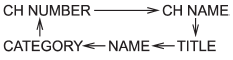
See also:
Volume control
Volume control
You can adjust the phone call volume, the
voice volume and the voice guidance
volume. Refer to “Volume control buttons”. ...
Checking the fluid level
WARNING
Be careful not to burn yourself because the fluid may be hot.
CAUTION
● When power steering fluid is being added, use only clean fluid, and be careful
not to allow any dirt into t ...
Front fog light (if equipped)
NOTE
It may be difficult to replace the bulbs. We recommend that you have the bulbs
replaced by your SUBARU dealer if necessary.
1. Pull off the fender lining. Refer to “Pulling off the fender lin ...