


High/low beam change (dimmer)
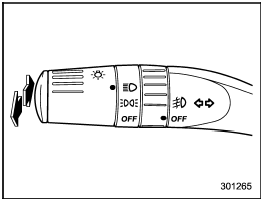
High/low beam change (dimmer)
To change from low beam to high beam,
push the turn signal lever forward. When
the headlights are on high beam, the high
beam indicator light “ ” on the
combination
meter is also on.
” on the
combination
meter is also on.
To switch back to low beam, pull the lever back to the detent position.
See also:
Replacing the battery
• Do not let dust, oil or water get on or in the transmitter when replacing the battery.
• Be careful not to damage the printed circuit board in the transmitter when replacing the battery.
• Be ...
Fuel economy hints
The following suggestions will help to save fuel.
• Select the proper gear position for the speed and road conditions.
• Avoid sudden acceleration or deceleration.
Always accelerate gently until yo ...
Volume control
You can adjust the phone call volume, the voice volume and the voice guidance
volume. Refer to “Volume control switch” F5-32.
Adjustable level of each volume
...