


Power switch and volume control
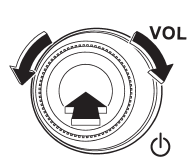
The dial is used for both power (ON/OFF) and volume control. The radio is turned ON and OFF by pressing the dial, and the volume is controlled by turning the dial.
See also:
Using the cover
To extend the cover, pull the end of the cover out of the housing, then insert
its hooks into the catches as shown. To rewind it, unhook it from the catches and
it will rewind automatically. You ...
Display selection (type C audio)
Select an item to be displayed using the
same method as when a CD is played.
Refer to “Display selection (type A, B and
C audio)”. Each time you briefly
press the button, the indication
chan ...
Air filtration system
Your vehicle’s air conditioning system is equipped with an air filtration system.
Replace the air filter element according to the replacement schedule shown in the
following table. This schedule s ...