


Control panel
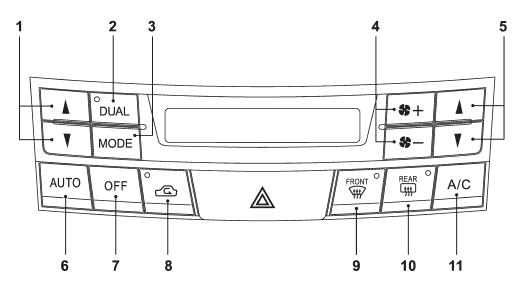
1) Temperature control button (driver’s side)
2) Dual mode button
3) Airflow mode selection button
4) Fan speed control button
5) Temperature control button (front passenger’s side)
6) AUTO button
7) OFF button
8) Air inlet selection button
9) Defroster button
10) Rear window defogger button (Refer to “Defogger and deicer” F3-34.)
11) Air conditioner button
See also:
Registering speed dial
1. After registering phonebook data, select
the “SPEED DIAL” menu.
2. Press the preset button (from
to
) in which you want to register the phone number.
NOTE
If the number to be used is al ...
Compass zone adjustment
Compass calibration zones
1. The zone setting is factory preset to Zone 8. Refer to the “Compass calibration zones” map shown above to verify that the compass zone setting is correct for your geograp ...
Outback
A shopping bag hook is attached to each side of the cargo area.
To use the hook, push the upper portion and the shopping bag hook will appear. ...