


AUTO button
FULL AUTO mode operation:
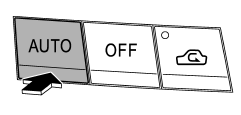
When the “AUTO” button is pressed, the indicator light “FULL AUTO” on the display illuminates. In this state, fan speed, airflow distribution, air-inlet control, and air conditioner compressor operation are automatically controlled.
AUTO mode operation:
If you operate any of the buttons on the control panel other than the “OFF” button, rear window defogger button and temperature control buttons during FULL AUTO mode operation, the indicator light “FULL” on the control panel will turn off and the indicator light “AUTO” will remain illuminated. You can then manually control the system as desired using the button you operated. To change the system back to the FULL AUTO mode, press the “AUTO” button.
See also:
“up” and “down” switch
With radio mode selected
Press the switch to the “” or “”
side briefly to skip to a preset channel. Press the switch to the “”
or “” side for more than 0.5 second
to seek the next receivable ...
SRS airbag (Supplemental Restraint System airbag)
SRS: This stands for supplemental restraint system. This name is used because the airbag system supplements the vehicle’s seatbelts.
Your vehicle is equipped with a crash sensing and diagnostic modul ...
Rear seats
WARNING
Seatbelts provide maximum restraint when the occupant sits well back and upright
in the seat. Do not put cushions or any other materials between occupants and seatbacks
or seat cushions ...