


Auto-dimming mirror with compass and HomeLink® (if equipped)
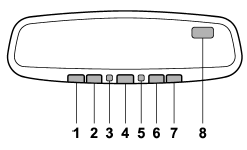
1) HomeLink® button 1
2) HomeLink® button 2
3) LED
4) HomeLink® button 3
5) Sensor
6) Automatic dimming on/off button
7) Compass display button
8) Compass display
The auto-dimming mirror has an anti-glare feature which automatically reduces glare coming from headlights of vehicles behind you. It also contains a built-in compass and HomeLink® wireless control system.
● By pressing the automatic dimming on/ off button, the automatic dimming function is toggled on or off. When the automatic dimming function is on, the LED indicator will illuminate.
Even with the mirror in the automatic dimming mode, the mirror surface turns bright if the transmission is shifted into reverse. This is to ensure good rearward visibility during reversing.
● By pressing the compass display button, the compass display is toggled on or off. When the compass is on, an illuminated compass reading will appear in the upper right corner of the mirror.
When cleaning the mirror, use a paper towel or similar material dampened with glass cleaner. Do not spray glass cleaner directly on the mirror as that may cause the liquid cleaner to enter the mirror housing and damage the mirror.
See also:
New vehicle break-in driving – the first 1,000 miles (1,600 km)
The performance and long life of your vehicle are dependent on how you handle
and care for your vehicle while it is new. Follow these instructions during the
first 1,000 miles (1,600 km):
● ...
Overview
Subaru launched the all-new, fourth-generation 2012 Subaru Impreza model at
the 2011 New York International Auto Show. Debuting bolder, more dynamic design
and new engines, Subaru's compact conten ...
Towing with all wheels on the ground
WARNING
● Never turn the ignition switch to the “LOCK” position while the vehicle is
being towed because the steering wheel and the direction of the wheels will be locked.
● Remember ...