


Type B inside mirror (if equipped)
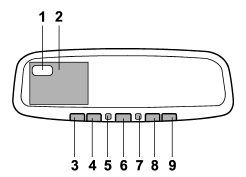
1) Electronic compass display
2) Rear view image display
3) HomeLink® button 1
4) HomeLink® button 2
5) Function indicator
6) HomeLink® button 3
7) Photosensor
8) Power button
9) Compass button
The mirror has the following features.
● Auto-dimming function for anti-glare capability ● Rear view image display ● Electronic compass display ● HomeLink® Wireless Control System
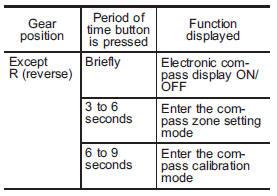
Using the power button and compass button, you can display the various functions of the rear view image display and the electronic compass display based on how long you press the buttons.
Power button
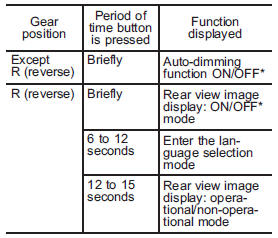
*: The setting returns to “ON” as a default setting every time the ignition switch is turned to the “OFF” position.
Compass button
See also:
Rear center seatbelt
Rear center seatbelt
1) Center seatbelt tongue plate
2) Connector (tongue)
3) Connector (buckle)
4) Center seatbelt buckle
Fastening the seatbelt with the webbing
twisted can increas ...
Rear window wiper blade assembly
1. Raise the wiper arm off the rear window.
2. Turn the wiper blade assembly counterclockwise.
3. Pull the wiper blade assembly toward you to remove it from the wiper arm.
4. Install the wiper ...
Braking tips
Never rest your foot on the brake
pedal while driving. This can cause
dangerous overheating of the
brakes and needless wear on the
brake pads and linings. ...