


To decrease the speed (by button)
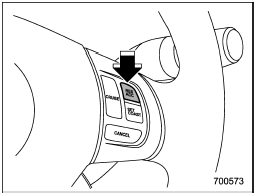
To decrease the speed (by button)
Push the “SET/COAST” button and hold it until the vehicle reaches the desired speed. Then, release the button. The vehicle speed at that moment will be memorized and treated as the new set speed.
When the difference between the actual vehicle speed and the set speed is less than 4 mph (6.8 km/h), the set speed can be lowered 1 mph (1.6 km/h) each time by pressing the “SET/COAST” button quickly.
See also:
Safety symbol
You will find a circle with a slash through it in this manual. This symbol means
“Do not”, “Do not do this”, or “Do not let this happen”, depending upon the context. ...
Front fog light indicator light (if equipped)
This indicator light illuminates while the front fog lights are illuminated. ...