


Auto-dimming function
The auto-dimming function is an anti-glare capability which automatically reduces glare coming from headlights of vehicles behind you.
By pressing the power button, the autodimming function is toggled on or off.
When the auto-dimming function is on, the function indicator will illuminate in green. Even with the mirror in anti-glare mode, the mirror surface turns bright if the transmission is shifted into the “R” (reverse) position. This is to ensure good rearward visibility during reversing.
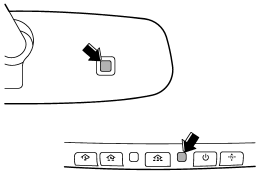
The mirror has a photosensor attached on both the front and back sides. During nighttime driving, these sensors detect distracting glare from vehicle headlights behind you and automatically dim the mirror to eliminate glare and preserve your vision. For this reason, use care not to cover the sensors with stickers, or other similar items. Periodically wipe the sensors clean using a piece of dry soft cotton cloth or an applicator.
NOTE
When cleaning the mirror, use a paper towel or similar item dampened with glass cleaner. Do not spray glass cleaner directly on the mirror surface. By doing so, the sprayed glass cleaner could enter the inside of the mirror housing. That may cause a malfunction in the mirror.
See also:
Vehicle Dynamics Control warning light/Vehicle Dynamics Control operation indicator
light
The light illuminates when the ignition switch is turned to the “ON” position
and turns off several seconds after the engine has started. This lighting pattern
indicates that the Vehicle Dynamic ...
Temporary release
When the driver stops the vehicle and pulls the parking brake lever after manually setting the initial LSD torque, the LSD torque is temporarily minimized. However the indicator on the combination met ...
Airflow control dial
Each dial position activates the following
air outlets.
(Ventilation): Instrument panel
outlets
(Bi-level): Instrument panel
outlets and
foot outlets
(Heat): Foot outlets, both sid ...