


Warning and indicator lights
Subaru Legacy / Subaru Legacy Owners Manual / About vehicle / Illustrated index / Warning and indicator lights
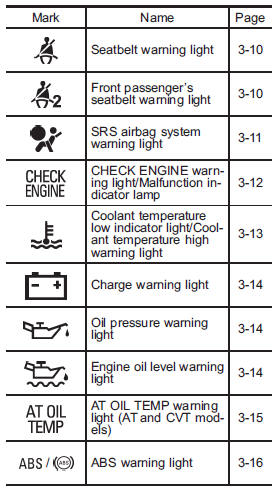
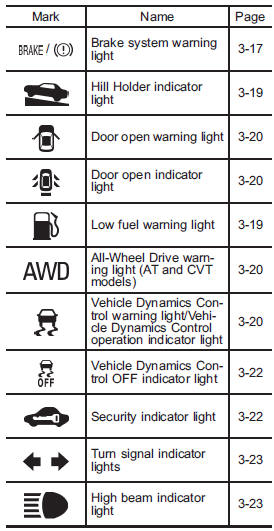
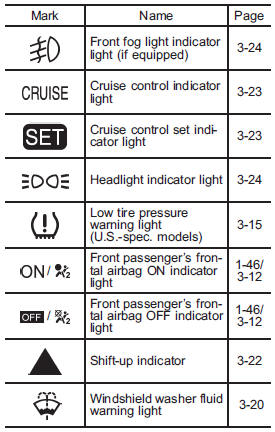
See also:
Ashtray (if equipped)
CAUTION
● Do not use ashtrays as waste receptacles or leave a lighted cigarette in an
ashtray. This could cause a fire.
● Always extinguish matches and cigarettes before putting them i ...
Replacing the air cleaner element
Replace the air cleaner element according to the maintenance schedule in the “Warranty and Maintenance Booklet”. Under extremely dusty conditions, replace it more frequently. It is recommended that yo ...
Adverse safety consequences of under-inflation
Driving at high speeds with excessively low tire pressures can cause the tires
to flex severely and to rapidly become hot. A sharp increase in temperature could
cause tread separation, and failure ...