


Trunk light
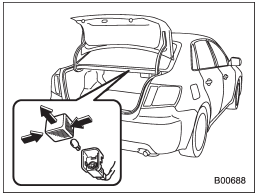
1. Remove the cover by squeezing its sides and pulling it.
2. Pull the bulb out of the socket.
3. Install a new bulb.
4. Reinstall the cover.
See also:
Checking the fluid level when the fluid is cold
When the fluid level has to be checked without time to warm up the automatic transmission, check to see that the fluid level is between the lower level and upper level on the “COLD” range. If it is be ...
Key lock-in prevention function
This function prevents the doors from
being locked with the key still in the
ignition switch. ...
To use as semi-automatic climate control system
Each function can be individually set to AUTO mode independently of the others.
Any function set to AUTO mode is controlled automatically. Any function not set to AUTO mode can be manually adjusted a ...