


Auto mode
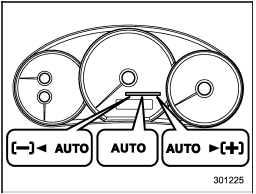
In the auto mode, the system estimates the driving and road conditions using signals from the wheel speed sensor, throttle position sensor, steering angle sensor and brake switch, etc. According to the result, it electronically and automatically controls the degree of limitation of the differential action (LSD torque) to optimize the differential action of the center differential. When the ignition switch is turned ON, the “AUTO” indicator light on the combination meter illuminates.
The auto mode has 3 modes as follows.
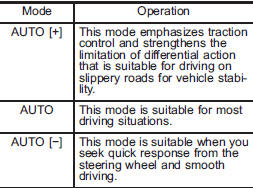
Mode setting method
In most situations, it is recommended that the “AUTO” mode is selected.
![Push the control switch forward to select the “AUTO [+]” mode. After setting the mode, “” on the combination meter illuminates.](images/books/2706/2/index.256.gif)
Push the control switch forward to select the “AUTO [+]” mode. After setting the mode, “ ” on the combination meter illuminates.
![Pull the control switch rearward to select the “AUTO [−]” mode. After setting the mode, “” on the combination meter illuminates.](images/books/2706/2/index.258.gif)
Pull the control switch rearward to select the “AUTO [−]” mode. After setting the mode, “![When the “AUTO [+]” mode is selected, pull the control switch rearward to change to the “AUTO” mode. When the “AUTO [−]” mode is set, push the control switch forward to change to the “AUTO” mode.](images/books/2706/2/index.259.gif) ” on the combination meter illuminates.
” on the combination meter illuminates.
When the “AUTO [+]” mode is selected, pull the control switch rearward to change to the “AUTO” mode. When the “AUTO [−]” mode is set, push the control switch forward to change to the “AUTO” mode.
See also:
Making a phone call by saying name
1. Press the talk switch .
2. Say “DIAL BY NAME”.
3. Press the talk switch again.
4. Say the desired name (voice tag) to be called.
5. Select the “DIAL” menu or press the OFF hook switch . ...
Checking the fluid level when the fluid is cold
When the fluid level has to be checked without time to warm up the automatic transmission, check to see that the fluid level is between the lower level and upper level on the “COLD” range. If it is be ...
Scan tuning (SCAN)
If you press the “SCAN” button briefly
(type A, B and C audio)/continuously (type
D audio), the radio will switch to the scan
mode. In this mode, the radio scans
through the radio band until ...