


Cargo area light (5-door models)
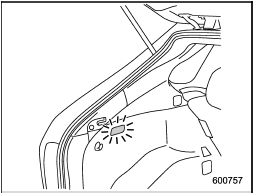
ON position: The light illuminates when the rear gate is opened. The light remains illuminated for several seconds and gradually turns off after the rear gate is closed.
OFF position: The light remains off.
See also:
Wheel replacement
When replacing wheels due, for example, to damage, make sure the replacement
wheels match the specifications of the wheels that are fitted as standard equipment.
Replacement wheels are available f ...
Other bulbs
It may be difficult to replace the bulbs.
Have the bulbs replaced by your SUBARU dealer if necessary. ...
Maintenance schedule
The scheduled maintenance items required to be serviced at regular intervals are shown in the “Warranty and Maintenance Booklet”.
For details of your maintenance schedule, read the separate “Warranty ...