


Voice command system
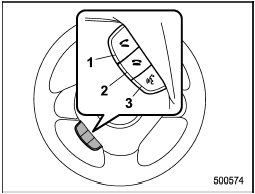
Voice command system
1) OFF hook switch
2) ON hook switch
3) Talk switch
To turn on the voice command system, press the talk switch  briefly. To
turn off the voice command system, wait for 5 seconds without using the voice command system.
briefly. To
turn off the voice command system, wait for 5 seconds without using the voice command system.
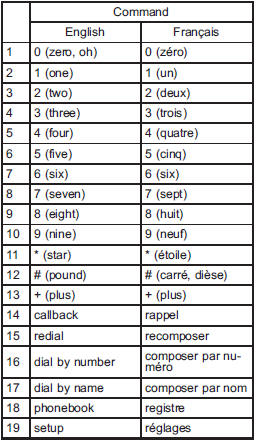
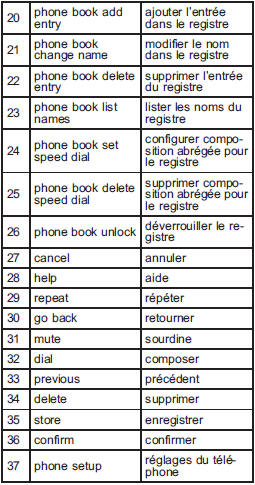
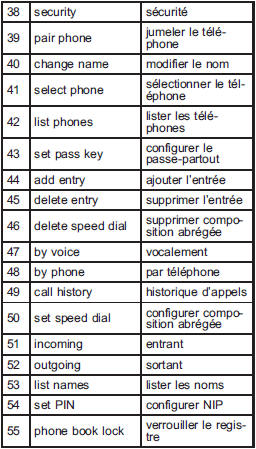
The commands available for the voice command system are listed in the following chart.
See also:
Windshield wiper blade rubber
1) Support
1. Grasp the locked end of the blade
rubber assembly and pull it firmly until the
stoppers on the rubber are free of the
support.
1) Metal spines
2. If the new blade rubber is ...
To turn off the cruise control
There are two ways to turn off the cruise control:
• Push the “CRUISE” main switch button again.
• Turn the ignition switch to the “Acc” or “LOCK” position (but only when the vehicle is completely s ...
Changing the coolant
WARNING
Never attempt to remove the radiator cap until the engine has been shut off and
has cooled down completely. Since the coolant is under pressure, you may suffer
serious burns from a spray ...