


Set speed dial
1. Select the “PHONE BOOK” menu.
2. Select “SET SPD DIAL” by operating the “TUNE/TRACK/CH” dial or select “SET SPEED DIAL” by using the voice command system.
3. Select the phone number by operating the “TUNE/TRACK/CH” dial/by pressing the talk switch  and saying the
voice tag.
and saying the
voice tag.
4. Select the “CONFIRM” menu.
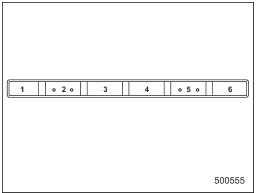
Preset buttons
5. Press the preset button in which you want to register the phone number.
NOTE
If the number to be used is already registered in speed dial, “OVERWRITE?” will be displayed.
See also:
Replacement of brake pad and lining
CAUTION
If you continue to drive despite the scraping noise from the audible brake pad
wear indicator, it will result in the need for costly brake rotor repair or replacement.
The right front di ...
Refrigerant for your climate control system
Your air conditioner uses ozone friendly refrigerant HFC134a. Therefore, the
method of adding, changing or checking the refrigerant is different from the method
for CFC12 (freon). Consult your SUB ...
Folding down the rear seatback
- When you fold down the seatback,
confirm that there are no
passengers or objects on the
rear seat. Not doing so creates
a risk of injury or property damage
if the seatback suddenly
f ...