


Connecting USB storage device / iPod®

• If the data stored in an iPod® is deleted while it is connected to the in-vehicle system, the data cannot be recovered.
• Do not store an iPod® in the vehicle. If an iPod® is left in the vehicle for a long period of time, it may be deformed, discolored or damaged by high temperature.
NOTE
• Even if a USB storage device or iPod® is connected, it cannot be played unless the “CD/AUX” button is pressed.
• A movie cannot be played while an iPod® is connected.
• While an iPod® is connected, the iPod® cannot be operated using the click wheel on the iPod®. However, touch panel equipped models can be operated.
• When using an iPod® by connecting it to in-vehicle equipment, the order of the list items displayed on the invehicle equipment may be different from that on the iPod®. However, this does not indicate a malfunction.
• An iPod® battery that is connected to in-vehicle equipment will be charged when the ignition switch is in the “ON” or “Acc” position. However, activation of the iPod® may be delayed if the battery charge of the iPod® is low.
• If an iPod® does not activate after operation, disconnect the connection cable from the iPod® and reset it. For the resetting procedure, see the User’s Guide that comes with the iPod®.
• If an iPod® and the connection cable are connected improperly, the iPod® cannot be powered on or will not be recognized by in-vehicle equipment. In this case, disconnect the connection cable from the iPod®, and then connect it again.
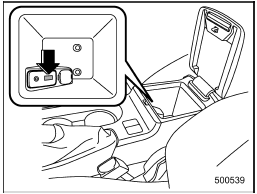
Except STI
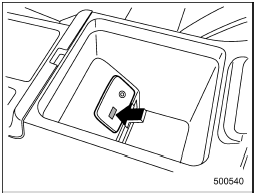
STI
The USB connector is located in the center console. Use the connector to connect a USB storage device / iPod®.
See also:
Voice command system
Talk switch
To turn on the voice command system, press the talk switch
briefly. To turn off the voice command
system, press the talk switch for more
than 1.5 seconds.
The commands available ...
Drinking and driving
Drinking and then driving is very dangerous. Alcohol in the bloodstream delays your reaction time and impairs your perception, judgment and attentiveness. If you drive after drinking – even if you d ...
Checking the clutch function
Check the clutch engagement and disengagement.
1. With the engine idling, check that there are no abnormal noises when the clutch pedal is depressed, and that shifting into 1st or reverse feels smoot ...