


When CD is in the player (type C)
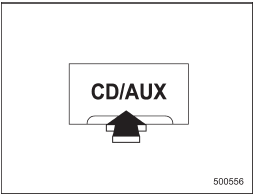
When CD is in the player (type C)
Each brief press of the “CD/AUX” button changes the modes in the following sequence.
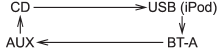
When the CD mode is selected, the player will start playback.
See also:
HomeLink® Wireless Control System
The HomeLink® Wireless Control System can be used to activate remote control
devices such as gate operators, garage door openers, door locks, home lighting and
security systems.
There are three H ...
Mist (for a single wipe)
Mist (for a single wipe)
For a single wipe of the wipers, pull the lever toward you. The wipers operate until you release the lever. ...
Replacing lost transmitters
If you lose a transmitter or want to purchase additional transmitters (up to
four can be programmed), you should reprogram all of your transmitters for security
reasons. It is recommended that you ...