


Operating the driver’s window (type A)
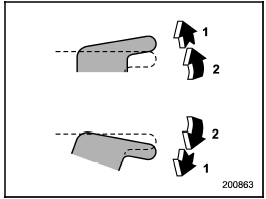
Operating the driver’s window (type A)
1) Automatically open/close
2) Open/close
To open:
Press the switch down lightly and hold it.
The window will open as long as the switch is held.
This switch also has a one-touch auto down function that allows the window to be opened fully without holding the switch.
Press the switch down until it clicks and release it, and the window will fully open.
To stop the window halfway, pull the switch up lightly.
To close:
Pull the switch up lightly and hold it. The window will close as long as the switch is held.
This switch also has a one-touch auto up function that allows the window to be closed fully without holding the switch.
Pull the switch up until it clicks and release it, and the window will fully close. To stop the window halfway, press the switch down lightly.
NOTE
If the vehicle’s battery is disconnected
due to situations such as battery or
fuse replacement, the one-touch auto
up/down function is deactivated. Initialize
the power window to reactivate
the one-touch auto up/down function.
Refer to “Initialization of power window (type A)”.
See also:
Temperature control dial
Temperature control dial
This dial is used to set the desired interior temperature. With the dial set to your desired temperature, the system automatically adjusts the temperature of air supplied fro ...
Anti-entrapment function
When the moonroof senses a substantial
enough object trapped between its glass
and the vehicle’s roof during closure, it
automatically moves back by 6 in (15 cm)
from that point and then stops ...
Compass calibration
1. If a “C” is displayed in the compass window, the compass needs to be calibrated.
2. Drive the vehicle in a circle at 5 mph (8 km/h) or less until the display reads
a direction.
3. Your can also ...