


Passengers’ side switches
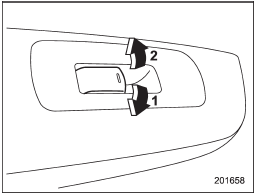
Passengers’ side switches
1) Open
2) Close
To open:
Push the switch down and hold it until the window reaches the desired position.
To close:
Pull the switch up and hold it until the window reaches the desired position.
When the lock switch on the power window switch cluster, located on the driver’s side door, is in the “LOCK” position, the passengers’ windows cannot be operated with the passengers’ switches.
See also:
Average fuel consumption
1) U.S.-spec. models
2) Except U.S.-spec. models
This indication shows the average rate of fuel consumption since the trip meter was last reset.
When either of the trip meter indications is reset ...
Tachometer
The tachometer shows the engine speed in thousands of revolutions per minute.
CAUTION
Do not operate the engine with the pointer of the tachometer in the red zone.
In this range, fuel injection wi ...
FM reception
Although FM is normally static free, reception can be affected by the surrounding
area, atmospheric conditions, station strength and transmitter distance. Buildings
or other obstructions may cause ...