


Side ventilators
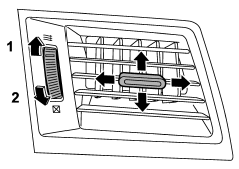
1) Open
2) Close
Move the tab to adjust the flow direction. To open the ventilator, turn the side
grille open/close wheel upward to the “ ”
”
position.
To close it, turn the wheel downward to the “ ”
”
position.
See also:
Setting guidance volume
To set the guidance volume, perform the
following procedure.
1. Select the “GUIDANCE VOL”/“GUIDANCE
VOLUME” menu.
2. Set the guidance volume by operating
the “TUNE/TRACK/CH” dial. ...
Difference between screen and actual road
The distance markers show the distance for a level road when the vehicle is not
loaded. It may be different from the actual distance depending on the loading conditions
or road conditions.
When t ...
Conditions in which front passenger’s SRS frontal airbag is activated
The front passenger’s SRS frontal airbag
will be activated for deployment upon
impact when any of the following conditions
are met regarding the front passenger’s
seat.
- When the seat is occ ...