


Battery drainage prevention function
If a door or the rear gate (5-door) is not completely closed, the interior lights will remain illuminated as a result. However, several lights are automatically turned off by the battery drainage prevention function to prevent the battery from discharging.
The following interior lights are affected by this function.
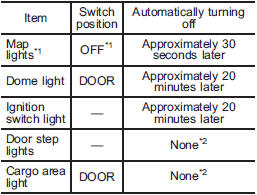
*1: The battery drainage prevention function affects only the map lights on models with the moonroof, and only when the map light switches are in the OFF position. The map lights on models without the moonroof do not turn off automatically, so push the light switches manually to turn them off.
*2: The door step lights and the cargo area light are not affected by the battery drainage prevention function, so the lights do not turn off automatically. To turn off the lights, it is necessary that each door and the rear gate (5- door) are completely closed.
The operational/non-operational setting of this function can be changed by a SUBARU dealer. Contact your SUBARU dealer to change the setting.
NOTE
• The factory setting (default setting) for this function is set as “operational”.
• When leaving the vehicle, please make sure that all doors and the rear gate (5-door) are completely closed.
• The battery drainage prevention function does not operate while the key is in the ignition switch.
See also:
Ventilation
To force outside air through the instrument panel outlets:
1. Set the air inlet selection button to the OFF position.
2. Press the “” button.
3. Set the temperature control dial all the way left.
...
Foreword
Congratulations on choosing a SUBARU vehicle. This Owner’s
Manual has all the information necessary to keep your SUBARU in
excellent condition and to properly maintain the emission control
syste ...
Certification for the Handsfree system
FCC WARNING
Changes or modifications not expressly approved by the party responsible for compliance could void the user’s authority to operate the equipment.
NOTE
This device complies with Part ...