


Type A seat heater
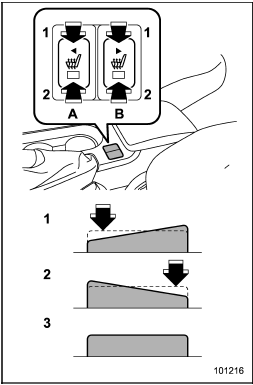
Type A seat heater
1) HI – Rapid heating
2) LO – Normal heating
3) OFF – Off
A) Left-hand side
B) Right-hand side
To turn on the seat heater, push the “LO” or “HI” position on the switch, as desired, depending on the temperature.
Selecting the “HI” position will cause the seat to heat up quicker.
To turn off the seat heater, lightly press the opposite side of the current position.
The indicator located on the switch illuminates when the seat heater is in operation.
When the vehicle’s interior is warmed enough or before you leave the vehicle, be sure to turn the switch off.
See also:
Brake pedal
Check the brake pedal free play and reserve distance according to the maintenance
schedule in the “Warranty and Maintenance Booklet”. ...
Taking a phone call and declining an incoming call
To take a phone call: Press the OFF hook switch0
.
To put an incoming call on hold: Press the ON hook switch briefly
.
To decline an incoming call: Press the ON hook switch
for more than 1.5 sec ...
Tire care – maintenance and safety practices
● Check on a daily basis that the tires are free from serious damage, nails,
and stones. At the same time, check the tires for abnormal wear.
● Inspect the tire tread regularly and repl ...