


Combination meter
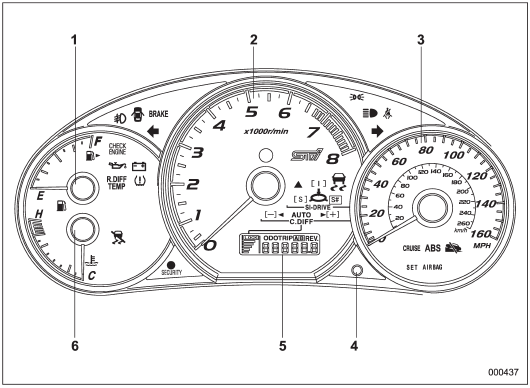
U.S.-spec. models (STI)
1) Fuel gauge
2) Tachometer
3) Speedometer
4) Trip meter A/B selection and trip meter reset knob
5) Odometer/Trip meter
6) Temperature gauge
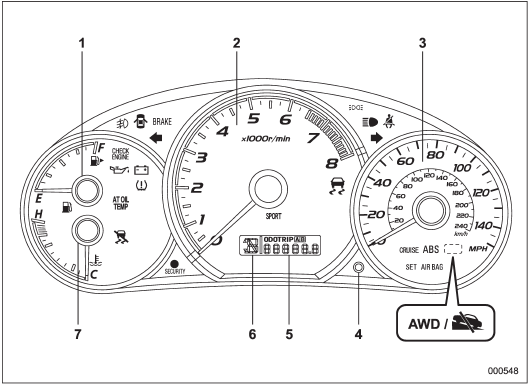
U.S.-spec. models (turbo models except STI)
1) Fuel gauge
2) Tachometer
3) Speedometer
4) Trip meter A/B selection and trip meter reset knob
5) Odometer/Trip meter
6) Select lever/gear position indicator (AT models)
7) Temperature gauge
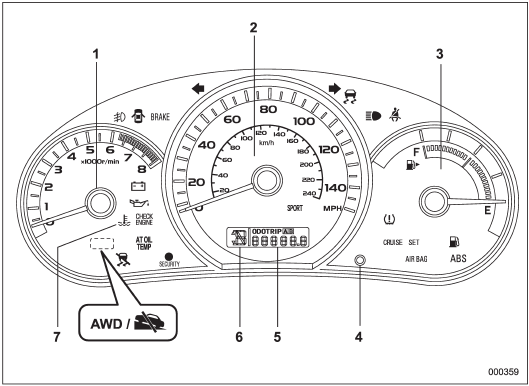
U.S.-spec. models (non-turbo models)
1) Tachometer
2) Speedometer
3) Fuel gauge
4) Trip meter A/B selection and trip meter reset knob
5) Odometer/Trip meter
6) Select lever/gear position indicator (AT models)
7) Coolant temperature warning/indicator light
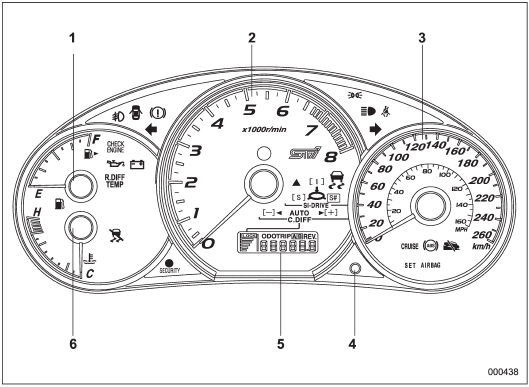
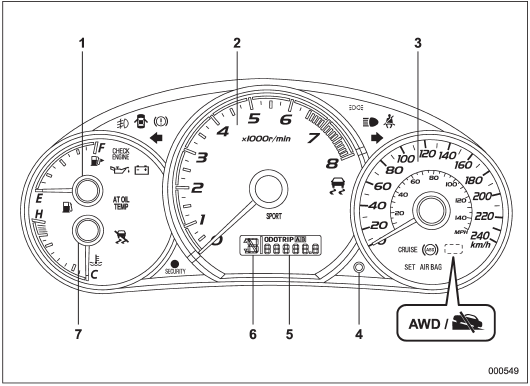
Except U.S.-spec. models (STI)
1) Fuel gauge
2) Tachometer
3) Speedometer
4) Trip meter A/B selection and trip meter reset knob
5) Odometer/Trip meter
6) Temperature gauge
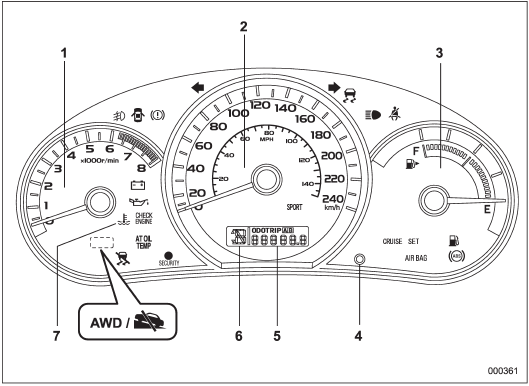
Except U.S.-spec. models (turbo models except STI)
1) Fuel gauge
2) Tachometer
3) Speedometer
4) Trip meter A/B selection and trip meter reset knob
5) Odometer/Trip meter
6) Select lever/gear position indicator (AT models)
7) Temperature gauge
Except U.S.-spec. models (non-turbo models)
1) Tachometer
2) Speedometer
3) Fuel gauge
4) Trip meter A/B selection and trip meter reset knob
5) Odometer/Trip meter
6) Select lever/gear position indicator (AT models)
7) Coolant temperature warning/indicator light
See also:
Seat fabric
Remove loose dirt, dust or debris with a vacuum cleaner. If the dirt is caked
on the fabric or hard to remove with a vacuum cleaner, use a soft brush then vacuum
it. Wipe the fabric surface with a ...
Garage door opener programming in the U.S.A.
NOTE
When programming the HomeLink®
Wireless Control System for a garage
door opener, it is suggested that you
park the vehicle outside the garage.
1. Unplug the motor of the garage door
op ...
Horn
To sound the horn, push the horn pad. ...