


Turbo models
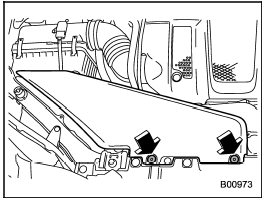
1. Use a screwdriver to undo the clips on the air intake duct, then remove the air intake duct.
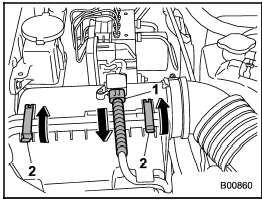
1) Connector
2) Clip
2. Unplug the connector that is attached to the top of the air cleaner case.
3. Unsnap the two clips holding the air cleaner case cover.
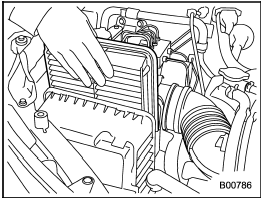
4. Open the air cleaner case cover and remove the air cleaner element.
5. Clean the inside of the air cleaner case and case cover with a damp cloth and install a new air cleaner element.
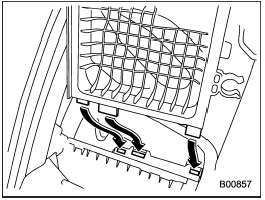
6. If the air cleaner case has been removed, insert the three projections on the air cleaner case into the slits on the air cleaner case cover.
7. Install in the reverse order of removal.
See also:
Warranties and maintenance
SUBARU warranties do not apply to
vehicle damage or malfunction caused
by trailer towing. If you use your vehicle to
tow a trailer, more frequent maintenance
will be required due to the additi ...
Turbo models
...
Bulb chart
NOTE
Lights from A to D are the LED (Light Emitting Diode) type. Consult your SUBARU
dealer for replacement.
• Bulbs may become very hot while illuminated. Before replacing bulbs, turn off ...