


Vehicle Dynamics Control OFF switch
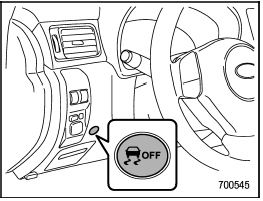
Vehicle Dynamics Control OFF switch
Pressing the switch to deactivate the
Vehicle Dynamics Control system can
facilitate the following operations:
- a standing start on a steeply sloping
road with a snowy, gravel-covered, or
otherwise slippery surface
- extrication of the vehicle when its
wheels are stuck in mud or deep snow
When the switch is pressed during engine operation, the Vehicle Dynamics Control OFF indicator light on the combination meter illuminates. The Vehicle Dynamics Control system will be deactivated and the vehicle will behave like a model not equipped with the Vehicle Dynamics Control system. When the switch is pressed again to reactivate the Vehicle Dynamics Control system, the Vehicle Dynamics Control OFF indicator light turns off.
With the Vehicle Dynamics Control system deactivated, traction and stability enhancement offered by Vehicle Dynamics Control system is unavailable. Therefore you should not deactivate the Vehicle Dynamics Control system except under above-mentioned situations.
NOTE
- The Vehicle Dynamics Control system
will be activated automatically
when the engine is started.
- If the switch is held down for 10 seconds or longer, the indicator light turns off, the Vehicle Dynamics Control system is activated, and the system ignores any further pressing of the switch. To make the switch usable again, turn the ignition switch to the “LOCK” position and restart the engine.
- When the switch is pressed to deactivate the Vehicle Dynamics Control system, the vehicle’s running performance is comparable with that of a vehicle that does not have a Vehicle Dynamics Control system. Do not deactivate the Vehicle Dynamics Control system except when absolutely necessary.
- Even when the Vehicle Dynamics Control system is deactivated, components of the brake control system may still activate. When the brake control system is activated, the Vehicle Dynamics Control operation indicator light illuminates.
See also:
Fan speed control dial
Fan speed control dial
The fan operates only with the ignition
switch in the ON position. The fan speed
control dial is used to select the AUTO
(automatic control) mode or to select the
des ...
Front passenger’s seat (if equipped)
1) Seat position forward/backward control switch
To adjust the seat forward or backward, move the control switch forward or backward.
2) Seatback angle (reclining) control switch
To adjust the an ...
Adverse safety consequences of overloading on handling and stopping and on
tires
Overloading could affect vehicle handling, stopping distance, and vehicle and tire performance in the following ways. This could lead to an accident and possibly result in severe personal injury.
• V ...