


Glove box
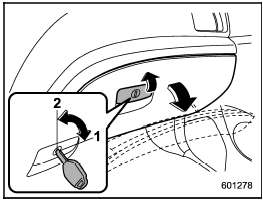
Glove box
1) Lock
2) Unlock
To open the glove box, pull the handle. To close it, push the lid firmly upward.
To lock the glove box, insert the key and turn it clockwise. To unlock the glove box, insert the key and turn it counterclockwise.
See also:
Setting the playing speed (only when
the audiobook is playing) (type D audio)
Each time you briefly press (the
“RPT” button) while the audiobook is
playing, the playing speed changes in
the following sequence.
...
Seatbelt maintenance
To clean the seatbelts, use a mild soap and lukewarm water. Never bleach or dye
the belts because this could seriously affect their strength.
Inspect the seatbelts and attachments including the web ...
Band selection
Press the “SAT” button when the radio is off to turn on the radio. Press the
“SAT” button when the radio is on to select SAT1, SAT2 or SAT3 reception. ...