


Cargo area light
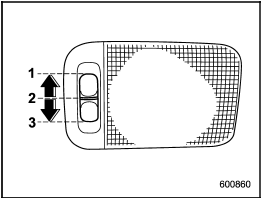
Cargo area light
1) DOOR
2) OFF
3) ON
The cargo area light switch has the following positions.
DOOR: The light illuminates when the rear gate is opened. The light remains illuminated for several seconds and turns off after the rear gate is closed.
OFF: The light remains off.
ON: The light remains on continuously.
See also:
To open and close the trunk lid from outside
The trunk lid can be opened using the remote keyless entry system. Refer to “Remote keyless entry system”.
To close the trunk lid, lightly press the trunk lid down until the latch engages.
NOTE
Do ...
Seat fabric
Remove loose dirt, dust or debris with a vacuum cleaner. If the dirt is caked on the fabric or hard to remove with a vacuum cleaner, use a soft brush then vacuum it.
Wipe the fabric surface with a ti ...
Recommended spark plugs
For the recommended spark plugs, refer to “Electrical system”. ...