


FM/AM selection
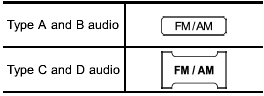
Push the “FM/AM” button when the radio is off to turn on the radio.
Push the “FM/AM” button when the radio is on to select the reception.
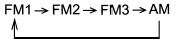
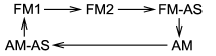
Each brief press of the “FM/AM” button changes the radio in the following sequence starting from the last radio band with you selected.
Type A, B and C audio:
Type D audio:
See also:
3.6 L models
1) Power steering fluid reservoir (page 11-27)
2) Differential gear oil level gauge (page 11-26)
3) Automatic transmission fluid level gauge (page 11-24)
4) Brake fluid reservoir (page 11-28)
5) ...
Remote engine start system (dealer option)
- Do not remote start a vehicle in
an enclosed environment (e.g., in
a closed garage). Prolonged operation
of a motor vehicle in an
enclosed environment can cause
a harmful build-up of C ...
Conditions in which front passenger’s SRS frontal airbag is activated
The front passenger’s SRS frontal airbag will be activated for deployment upon
impact when any of the following conditions is met regarding the front passenger’s
seat.
● When the seat is oc ...