


Temperature control dial
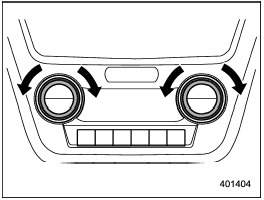
Temperature control dial
To increase the temperature setting, turn the temperature control dial clockwise. To decrease the temperature setting, turn the dial counterclockwise.
Each temperature setting is shown on the display.
See also:
Audio control buttons (if equipped)
Type A audio
Type B audio
These buttons are located on the spokes of the steering wheel. They allow the
driver to control audio functions without taking his/her hands off the steering
wheel. ...
Measuring and adjusting air pressure to achieve proper inflation
Check and, if necessary, adjust the pressure of each tire (including the spare)
at least once a month and before any long journey. Check the tire pressures when
the tires are cold. Use a pressure ...
Rear ashtray (STI – if equipped)
Rear ashtray (STI – if equipped)
The rear ashtray is located on the upper side of the back of the center console. To open the ashtray, pull the upper edge of the lid.
Fully close the lid after using ...