


Mist (for a single wipe)
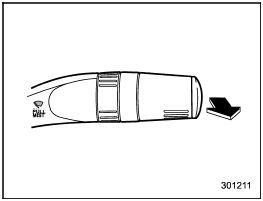
Mist (for a single wipe)
For a single wipe of the wipers, pull the lever toward you. The wipers operate until you release the lever.
See also:
Changing the voice tag of the cell phone
1. Select the “CHANGE NAME” menu. If
no cell phones are registered, “EMPTY” is
displayed and the mode changes to the
“PHONE SETUP” mode.
2. Select the cell phone by operating the
“TUNE/TRACK/ ...
How to eject a CD from the player (type A)
When a disc is being played back or when a disc is in the player, press the eject
button “”. The disc will be ejected.
NOTE
● Avoid driving the vehicle with a CD sticking out, because vibr ...
Garage door opener programming in the U.S.A.
NOTE
When programming the HomeLink® Wireless Control System for a garage door opener, it is suggested that you park the vehicle outside the garage.
1. Unplug the motor of the garage door opener from ...