


Front passenger’s seat (if equipped)
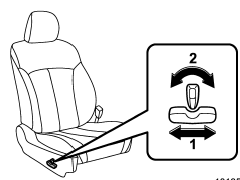
1) Seat position forward/backward control switch To adjust the seat forward or backward, move the control switch forward or backward.
2) Seatback angle (reclining) control switch To adjust the angle of the seatback, move the control switch.
See also:
Before driving your vehicle
Before entering the vehicle, remove any snow or ice from your shoes because that
could make the pedals slippery and driving dangerous.
While warming up the vehicle before driving, check that the ac ...
Examples of the types of accidents in which deployment of the
driver’s/driver’s and front passenger’s SRS frontal airbag(s) is unlikely to
occur.
1) The vehicle strikes an object, such as a telephone pole or sign pole.
2) The vehicle slides under the load bed of a truck.
3) The vehicle sustains an oblique offset frontal impact.
4) The vehi ...
Band selection
Press the “SAT” button when the radio is off to turn on the radio. Press the
“SAT” button when the radio is on to select SAT1, SAT2 or SAT3 reception. ...