


Function settings
A SUBARU dealer can change the settings of the functions shown in the following table to meet your personal requirements. Contact the nearest SUBARU dealer for details. If your vehicle is equipped with the genuine SUBARU navigation system, the settings for some of these functions can be changed using the navigation monitor. For details, please refer to the Owner’s Manual supplement for the navigation system.
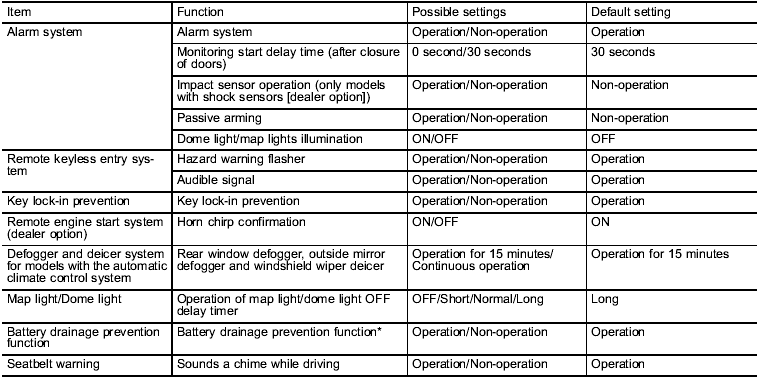
*: The setting can only be changed at a SUBARU dealer.
See also:
Registering speed dial
1. After registering phonebook data, select the “SPEED DIAL” menu.
Preset buttons
2. Press the preset button in which you want to register the phone number.
NOTE
If the number to be used is alread ...
Key number
1) Key number plate
2) Security ID plate
The key number is stamped on the key number plate attached to the key set.
Write down the key number and keep it in another safe place, not in the vehicle ...
The Inside
While it's possible to get fairly comfortable in many cars, it's not every
day that you feel like everything is right in terms of your driving position,
and that's how I felt in the Impreza 2.5GT. ...