


Instrument panel
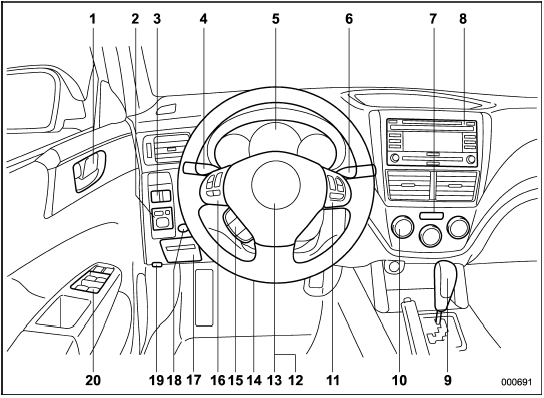
1) Door locks
2) Outside mirror switch
3) Illumination brightness control
4) Light control lever
5) Combination meter
6) Wiper control lever
7) Hazard warning flasher switch
8) Audio
9) Shift lever (MT)/Select lever (AT)
10) Climate control
11) Cruise control
12) Horn
13) SRS airbag
14) Tilt/telescopic steering
15) Hands-free switches
16) Audio control buttons
17) Fuse box
18) Vehicle Dynamics Control OFF switch
19) Hood lock release knob
20) Power windows
See also:
Removing and reinstalling clips
Removing clips
There are several types of clips used for your vehicle
Type A clips
1. Turn the clips counterclockwise using a flat-head screwdriver until the center
portion of the clip is raise ...
Cleaning aluminum wheels
● Promptly wipe the aluminum wheels clean of any kind of grime or agent. If dirt
is left on too long, it may be difficult to clean off.
● Do not use soap containing grit to clean the wh ...
Traction AA, A, B, C
The traction grades, from highest to
lowest, are AA, A, B and C. Those
grades represent the tire’s ability to
stop on wet pavement as measured
under controlled conditions on specified governme ...