


Vanity mirror light
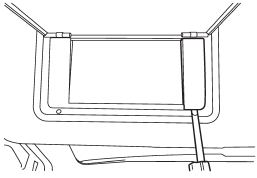
1. Remove the lens by prying the edge of the lens with a flat-head screwdriver.
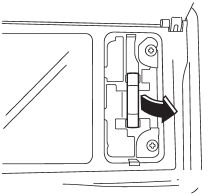
2. Pull the bulb out of the socket.
3. Install a new bulb.
4. Reinstall the lens.
See also:
Measuring and adjusting air pressure to achieve proper inflation
Check and, if necessary, adjust the pressure of each tire (including the spare) at least once a month and before any long journey. Check the tire pressures when the tires are cold. Use a pressure gaug ...
Checking the fluid level when the fluid is hot
1. Drive the vehicle several miles to raise the temperature of the transmission fluid up to normal operating temperature; 158 to 1768F (70 to 808C) is normal.
2. Park the vehicle on a level surface a ...
XMTM satellite radio (U.S.A. only)
XMTM is a continental U.S. based satellite radio service, which includes music, news, sports, talk and children’s programming.
XMTM provides digital quality audio and text information, including song ...