


Map light
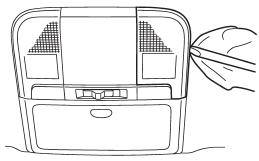
1. Remove the lens by prying the edge of the lens with a flat-head screwdriver.
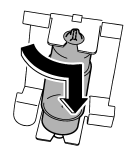
2. Turn the bulb until the flat surfaces at its ends are aligned vertically. Pull the bulb straight downward to remove it.
3. Install a new bulb.
4. Reinstall the lens.
See also:
In case a problem occurs
If you cannot activate a device using the
corresponding HomeLink® button after
programming, contact HomeLink® at
www.homelink.com or call 1-800-355-
3515 for assistance. ...
Auto-store
Using the Auto-store function, you can automatically store 6 stations on the
current waveband by pressing the “A.S” button for more than 2 seconds. Use Autostore
to quickly find the strongest st ...
Shift lock release
If the select lever cannot be operated, turn the ignition switch back to the
“ON” position then move the select lever to the “P” position with the select lever
button pressed and brake pedal depre ...