


Starting your vehicle
NOTE
All vehicle doors, the engine hood and trunk / rear gate must be closed prior to activating the remote engine start system. Any open entry point will prevent starting or cause the system to shut down.
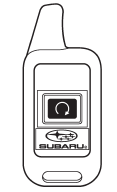
The remote engine start function is activated by pressing the “ ”
”
button twice within 3 seconds on your remote engine start transmitter. Upon successful
activation the remote start confirming transmitter button will flash once* and the
vehicle will honk the horn and flash the side marker lights, tail lights and front
position lights once. The system will check certain preconditions before starting,
and if all safety parameters are correct, the engine will start within 5 seconds.
Upon successful engine start, the remote start confirmation transmitter button will
flash twice every 5 seconds* and the vehicle will honk the horn and flash the side
marker lights, tail lights and the front position lights once, then the lights will
illuminate and remain illuminated, indicating that the engine is running. While
the vehicle is operating via the remote engine start function, the power window
features will be disabled. Also, the system has a timer and will shut down after
15 minutes if you do not operate the vehicle. Press and hold the “ ”
”
button for 2 seconds to turn the engine off. The remote start confirmation transmitter
button will flash three times* indicating that the engine has shut down. If the
starter cranks but does not start or starts and stalls, the remote engine start
system will power off and then attempt to start the engine an additional three times
unless the remote engine start system determines that a vehicle malfunction is preventing
the system from starting. If the engine does not start after additional attempts,
the remote engine start system will abort and return to a non-activate state.
*: Provided that the remote engine start transmitter is within the operating range of the system.
See also:
Vehicle Overview
A new 2.5 GT model in Subaru’s larger Legacy series consolidated the previous
GT and GT Limited for the 2003 model year. A new Sportshift feature for the
automatic transmission allowed manual gear ...
Locking the passengers’ windows
Locking the passengers’ windows
1) Lock
2) Unlock
Push the lock switch. When the lock
switch is in the “LOCK” position, the
passengers’ windows cannot be opened
or closed.
Push the switch ...
Trailer hitch (Outback — if equipped)
WARNING
● Never exceed the maximum weight specified for the trailer hitch. Exceeding
the maximum weight could cause an accident resulting in serious personal injuries.
Permissible trailer w ...