


To remove the cover housing
1. Rewind the cover.
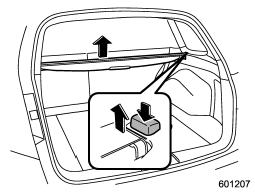
2. Hold down the button on the righthand rear quarter panel and lift up the right-hand cover housing.
3. Remove the cover housing.
See also:
Rocking the vehicle
If you must rock the vehicle to free it from snow, sand, or mud, depress the accelerator pedal slightly and move the shift lever/select lever back and forth between “1”/“D” and “R” repeatedly. Do not ...
Top tether anchorages
Your vehicle is equipped with two or three top tether anchorages so that a child restraint system having a top tether can be installed in the rear seat. When installing a child restraint system using ...
Sirius satellite radio
Sirius satellite radio is a recent innovation that allows the listener to experience
digital sound quality and to have a greater variety of channels.
Use of satellite radio (Sirius) requires a tune ...