


Glove box
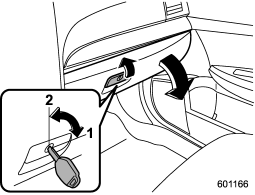
1) Lock
2) Unlock
To open the glove box, pull the handle. To close it, push the lid firmly upward.
To lock the glove box, insert the key and turn it clockwise. To unlock the glove box, insert the key and turn it counterclockwise.
See also:
Precautions against vehicle modification
To avoid accidental activation of the
system or rendering the system
inoperative, which may result in
serious injury, no modifications
should be made to any components
or wiring of the S ...
FM selection
Press the “FM” button when the radio is on to select FM1, FM2 or FM3 reception.
Each brief press of the “FM” button changes the radio in the following sequence
starting from the last FM radio ban ...
Tire care – maintenance and safety practices
● Check on a daily basis that the tires are free from serious damage, nails,
and stones. At the same time, check the tires for abnormal wear.
● Inspect the tire tread regularly and repl ...