


Volume control
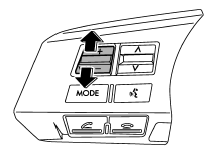
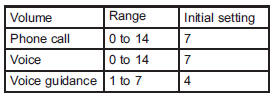
You can adjust the phone call volume, the voice volume and the voice guidance volume. Refer to “Volume control switch” F5-32.
Adjustable level of each volume
See also:
If you have accidentally triggered the alarm system
To stop the alarm
Do any of the following operations:
• Press any button on the remote transmitter.
• Turn the ignition switch to the “ON” position.
NOTE
Only registered keys will stop the alarm. ...
Dome light and cargo area light
Dome light
Cargo area light
1. Remove the lens by prying the edge of the lens with a flat-head screwdriver.
2. Pull the bulb out of the socket.
3. Install a new bulb.
4. Reinstall the lens. ...
Overhead console
To open the console, push on the lid lightly and it will automatically open.
CAUTION
When your vehicle is parked in the sun or on a warm day, the inside of the overhead
console heats up. Avoid s ...