


Channel selection by pressing the button
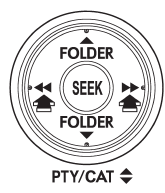
When in the SAT mode, briefly press the “SEEK” button “ ”
”
or “ ” to select the channel.
See also:
Rear view camera (if equipped)
Legacy
A rear view camera is attached to the trunk lid (Legacy) or rear gate (Outback).
When the ignition switch is “ON” and the shift lever (MT models) or select lever
(AT or CVT models) is se ...
Rear wiper
To turn the rear wiper on, turn the knob on the end of the wiper control lever
upward to the “INT” or “ON” position. To turn the wiper off, return the knob on
the end of the lever to the “OFF” pos ...
2011 Subaru Impreza WRX STi review By Scott Burgess
We all play favorites. Is that why we have elections? Or is it just for the
commercials?
In the automotive world, car buyers play favorites as well ∔ weighing the
pros and cons of differ ...