


Forward and backward adjustment
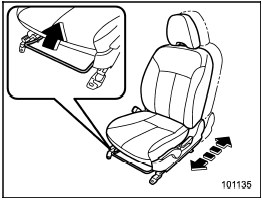
Forward and backward adjustment
Pull the lever upward and slide the seat to the desired position. Then release the lever and move the seat back and forth to make sure that it is securely locked into place.
See also:
SRS side airbag and SRS curtain airbag
The SRS side airbag is stored in the door
side of each front seat seatback, which
bears an “SRS AIRBAG” label.
In a moderate to severe side impact
collision, the SRS side airbag on the
impact ...
Safety
The 2010 Subaru Outback has been named a 2010 Top Safety Pick by the
Insurance Institute for Highway Safety. To earn this award, a car must get the
top score of Good in frontal-offset, side-impact ...
Operation
A) Driver’s side
B) Passenger’s side
1) SRS AIRBAGs deploy as soon as a collision occurs.
2) After deployment, SRS AIRBAGs start to deflate immediately so that the
driver’s vision is not obstru ...