


Center ventilators
Subaru Legacy / Subaru Legacy Owners Manual / Climate control / Ventilator / Ventilators / Center ventilators
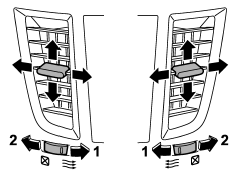
1) Open
2) Close
Move the tab to adjust the flow direction. To open the ventilator, turn the center
grille open/close wheel to the “ ” position.
To close it, turn the wheel to the “ ”
”
position.
See also:
Checking the oil level
AT models
1) Yellow handle
1. Park the vehicle on a level surface and stop the engine.
2. Pull out the level gauge, wipe it clean, and insert it again.
1) Upper level
2) Lower level
3. Pull ...
Spark plugs
It may be difficult to replace the spark plugs. It is recommended that you have the spark plugs replaced by your SUBARU dealer.
The spark plugs should be replaced according to the maintenance sched ...
Fuse panel located in the engine compartment
A) Main fuse
...