


Operating the passengers’ windows
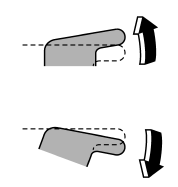
To open:
Press the appropriate switch down and hold it until the window reaches the desired position.
To close:
Pull the switch up and hold it until the window reaches the desired position.
See also:
Checking the coolant level
Check the coolant level at each fuel stop.
1. Check the coolant level on the outside of the reservoir while the engine is
cool.
2. If the level is close to or lower than the “LOW” level mark, ad ...
Traction AA, A, B, C
The traction grades, from highest to lowest, are AA, A, B and C. Those grades represent the tire’s ability to stop on wet pavement as measured under controlled conditions on specified government test ...
Display selection
If you press the “TEXT” button during playback, the indication will change to
the next one in the following sequence.
For CD-DA:
...