


Locking and unlocking from the outside
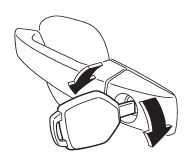
To lock the driver’s door from the outside with the key, turn the key toward the rear. To unlock the door, turn the key toward the front.
Pull the outside door handle to open an unlocked door.
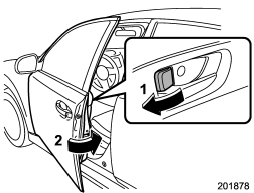
Locking without the key 1) Rotate the lock lever rearward.
2) Close the door.
To lock the door from the outside without the key, rotate the lock lever rearward and then close the door.
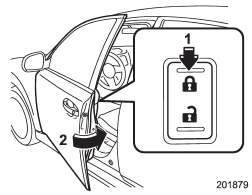
Locking without the key
1) Press the front side of the power door locking switch.
2) Close the door.
To lock the door from the outside using the power door locking switch, press the front side of the switch (“LOCK” side) and then close the door. In this case, all closed doors and the rear gate (Outback) are locked at the same time.
Always make sure that all doors and the rear gate are locked before leaving your vehicle.
NOTE
Make sure that you do not leave the key inside the vehicle before locking the doors from the outside without the key.
See also:
Driver’s seat
1) Seat position forward/backward control switch
To adjust the seat forward or backward, move the control switch forward or backward.
During forward/backward adjustment of the seat, you cannot ad ...
Checking the clutch pedal free play
1) 0.16 – 0.43 in (4.0 – 11.0 mm)
Lightly depress the clutch pedal down with your finger until you feel resistance, and check the free play.
If the free play is not within proper specification, co ...
2009 Subaru Forester review
It has been brought to my attention that there are places in the United
States where it snows. I was, at first, incredulous. Well, fine, says I. That
may be. But why would anyone live in a place w ...