


Rear window side seating position
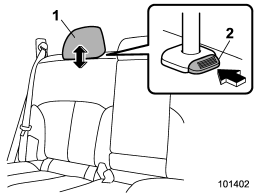
1) Head restraint 2) Release button
To raise:
Pull the head restraint up.
To lower:
Push the head restraint down while pressing the release button on the top of the
seatback.
To remove:
While pressing the release button, pull out the head restraint.
To install:
Install the head restraint into the holes that are located on the top of the seatback
until the head restraint locks.
The head restraint should be adjusted so that the center of the head restraint is closest to the top of the occupant’s ears. When the seats are not occupied, lower the head restraints to improve rearward visibility.
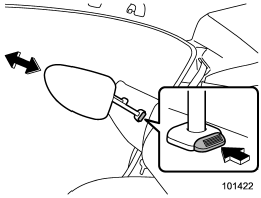
NOTE
For Legacy, it is not possible to remove or install the head restraint without folding down the rear seatback. Fold down the rear seatback and then remove or install the head restraint.
See also:
Page (track/folder title) scroll
If you press the “TEXT” button again for at least 0.5 second, the title will
be scrolled so you can see all of it.
NOTE
The display is designed to show titles for up to 30 characters. ...
Non-turbo models
Non-turbo models
1) Power steering fluid reservoir
2) Manual transmission oil level gauge (MT) or Differential gear oil level gauge
(AT)
3) Clutch fluid reservoir
4) Automatic transmission ...
Efficient cooling after parking in direct sunlight
After parking in direct sunlight, drive with the windows open for a few minutes to allow outside air to circulate into the heated interior. This results in quicker cooling by the air conditioner. Keep ...