


Abbreviation list
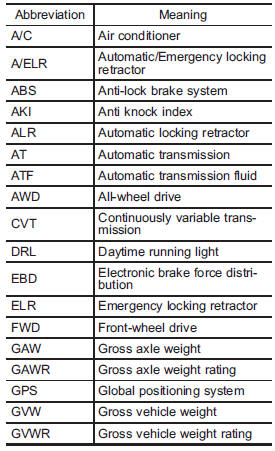
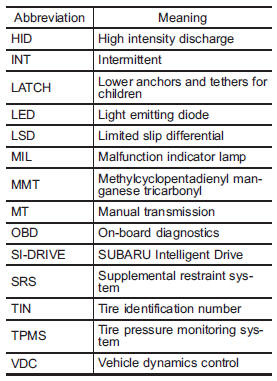
You will find several abbreviations in this manual. The meanings of the abbreviations are shown in the following list.
See also:
Road surface freeze warning indication
1) U.S.-spec. models
2) Except U.S.-spec. models
When the outside temperature drops to 378F (38C) or lower, the temperature indication flashes to show that the road surface may be frozen.
If the ...
Lubrication oil circulation in the refrigerant circuit
Operate the air conditioner compressor at a low engine speed (at idle or low
driving speeds) a few minutes each month during the off-season to circulate its
oil. ...
Entering the vehicle following remote engine start shutdown
An alarm trigger may occur if the vehicle is opened by the remote keyless entry
transmitter within a few seconds immediately following remote engine start shutdown. ...