


Trunk light
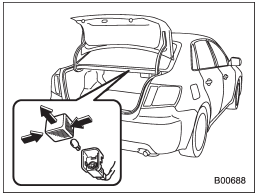
1. Remove the cover by squeezing its sides and pulling it.
2. Pull the bulb out of the socket.
3. Install a new bulb.
4. Reinstall the cover.
See also:
Key number
1) Key number plate
2) Security ID plate
The key number is stamped on the key number plate attached to the key set.
Write down the key number and keep it in another safe place, not in the vehicle ...
Category selection
To activate the category search mode, press the “PTY/CAT” button. To deactivate
the category search mode, press the “PTY/CAT” button again.
When in the category search mode, pressing the “FOLDE ...
Coolant temperature low indicator light/Coolant temperature high warning light
CAUTION
● After turning the ignition switch to the “ON” position, if this indicator light/warning
light behaves under any of the following conditions, the electrical system may be
malfuncti ...