


Cargo area light (5-door models)
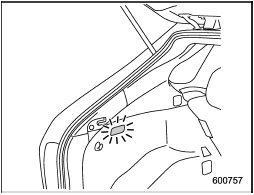
ON position: The light illuminates when the rear gate is opened. The light remains illuminated for several seconds and gradually turns off after the rear gate is closed.
OFF position: The light remains off.
See also:
Rear wiper
To turn the rear wiper on, turn the knob on the end of the wiper control lever upward to the “INT” or “ON” position.
To turn the wiper off, return the knob on the end of the lever to the “OFF” positi ...
All season tires
All season tires are designed to provide an adequate measure of traction, handling and braking performance in year-round driving including snowy and icy road conditions. However all season tires do no ...
Operating the HomeLink® Wireless Control System
Once programmed, the HomeLink® Wireless Control System can be used to remote-control the devices to which its buttons are programmed. To activate a device, simply press the appropriate button.
The in ...