


Menu list of the Hands-free system
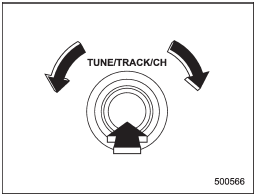
Menu list of the Hands-free system
Turn the “TUNE/TRACK/CH” dial to select a menu, and then press the dial to enter the selected menu.
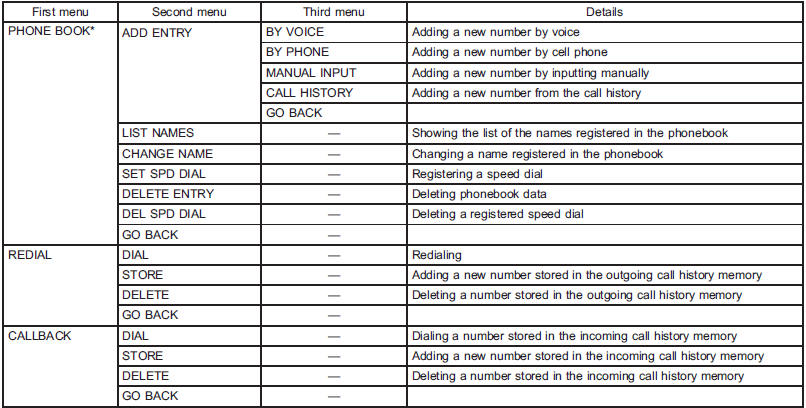
*: If a cell phone is not registered, the menu described in the chart is not indicated.
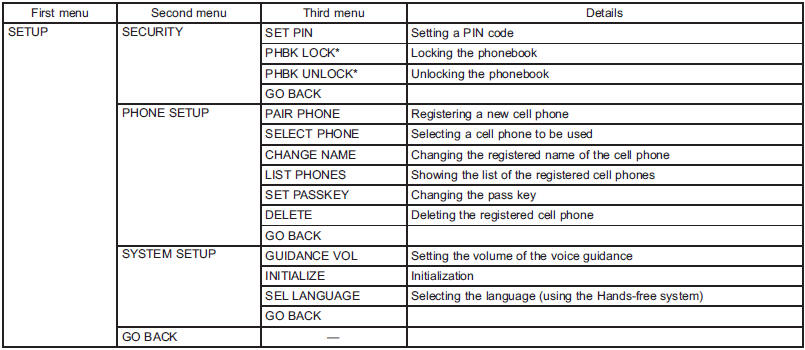
*: If a PIN code is not registered, the menu described in the chart is not available.
See also:
Armrest (if equipped)
Armrest (if equipped)
To lower the armrest, pull on the top edge of the armrest.
To avoid the possibility of serious injury, passengers must never be allowed to sit on the center armrest while t ...
Air filtration system
Your vehicle’s air conditioning system is equipped with an air filtration system.
Replace the air filter element according to the replacement schedule shown in the
following table. This schedule s ...
Waxing and polishing
Always wash and dry the vehicle before
waxing and polishing.
Use a good quality polish and wax and
apply them according to the manufacturer’s
instructions. Wax or polish when
the painted surf ...