


Registering speed dial
1. After registering phonebook data, select the “SPEED DIAL” menu.
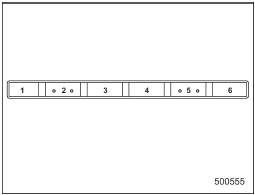
Preset buttons
2. Press the preset button in which you want to register the phone number.
NOTE
If the number to be used is already registered in speed dial, “OVERWRITE?” will be displayed.
See also:
Recommended clutch fluid
CAUTION
Never use different brands of clutch fluid together. Also, avoid mixing DOT 3
and DOT 4 brake fluids even if they are the same brand. ...
ABS (Anti-lock Brake System)
The ABS system prevents the lock-up of wheels which may occur during sudden braking or braking on slippery road surfaces.
This helps prevent the loss of steering control and directional stability cau ...
A/C – Air conditioner button
A/C – Air conditioner button
If the windshield starts to fog when the
climate control system is operated in the
AUTO mode, press the air conditioner
button “A/C” to defog and dehumidify.
Whe ...